PFMS Portal (pfms.nic.in): A Beginner’s Guide to All Features
If you’ve ever checked a scholarship status, received a subsidy, or heard about Direct Benefit Transfer (DBT), you’ve already interacted—directly or indirectly—with the Public Financial Management System (PFMS) portal.
At first glance, the PFMS website may look like a typical government portal. But behind that simple interface is a powerful system that manages billions of rupees and ensures that public money reaches the right people.
This guide is designed for beginners. No technical jargon—just a clear, practical understanding of every important feature on the PFMS portal.
What is PFMS Portal?
PFMS is an online platform developed by the Government of India to track, manage, and control government funds.
It connects:
- Ministries and departments
- Banks
- Government agencies
- Beneficiaries (citizens)
In simple terms: PFMS ensures that money released by the government reaches the correct person without delay or leakage.
Official Website
To use PFMS, always go to: https://pfms.nic.in
This is the only official and secure portal.
Homepage Overview
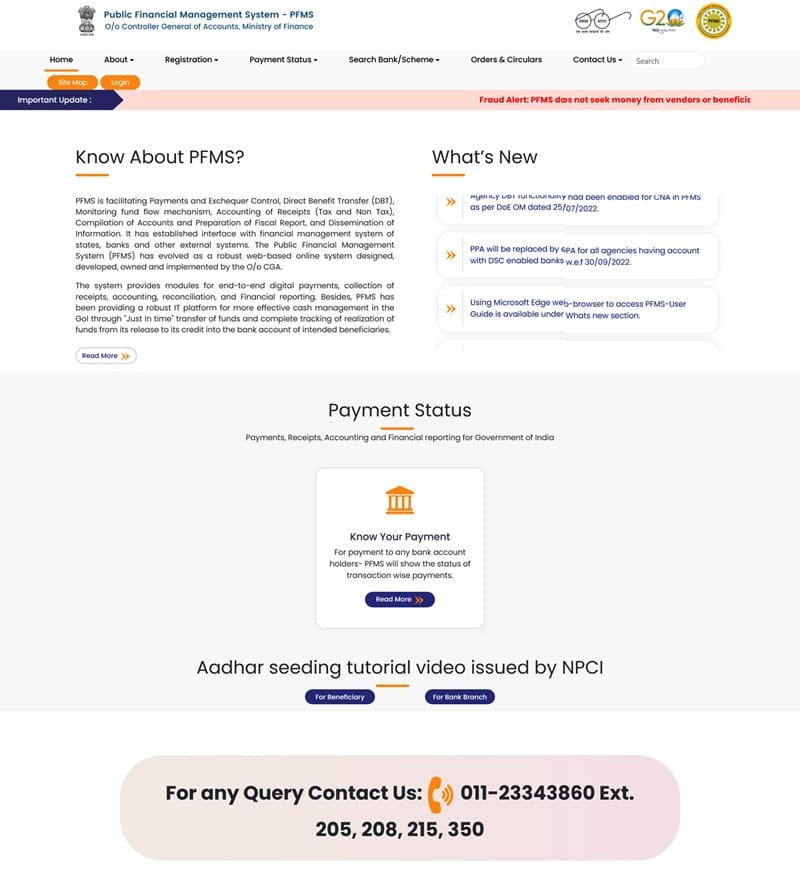
When you open the homepage, you’ll see a clean layout with several key sections:
Top Navigation Menu:
- Home
- About
- Registration
- Payment Status
- Search Bank/Scheme
- Orders & Circulars
- Contact Us
- Login
This menu is your main control panel.
Important Alert (Fraud Warning)
Right below the menu, there is a red alert message:
PFMS does NOT ask for money to process payments.
This is important. Many scams happen in the name of government schemes.
1. Know Your Payment (Most Useful Feature)
This is the most popular feature for common users.
What it does:
- Tracks payments like:
- Scholarships
- Subsidies
- Pensions
- DBT benefits
How to use:
- Click “Know Your Payment”
- Enter bank account details
- View status instantly
What you’ll see:
- Payment status (Success / Pending / Failed)
- Amount
- Date
- Scheme name
No login required. This is ideal for students and beneficiaries.
2. Payment Status Section
This section highlights the payment tracking feature.
Key Benefit:
You don’t need to visit any office or depend on anyone. You can check everything yourself.
3. Login Dashboard (For Officials)
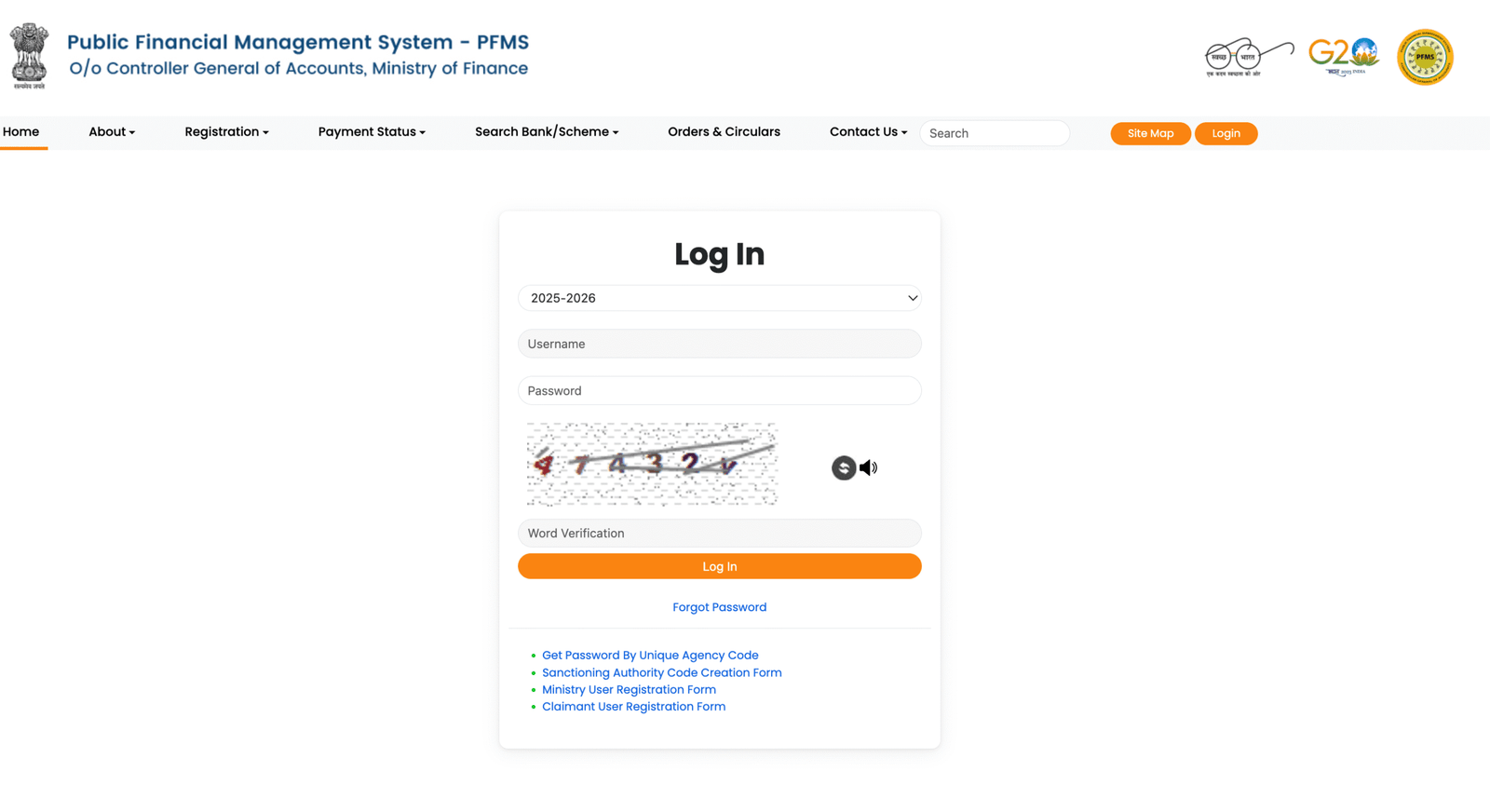
The login option is meant for:
- Government officers
- Agencies
- DDOs
Inside the dashboard:
- Scheme management
- Fund allocation
- Payment processing
- Report generation
Regular users do NOT need login access.
4. Scheme Management
This is a backend feature used by officials.
What it includes:
- Creating schemes
- Mapping schemes to agencies
- Linking bank accounts
- Defining components (central/state share)
Without proper scheme setup, payments cannot be processed.
5. Direct Benefit Transfer (DBT)
PFMS is the backbone of DBT in India.
What DBT does:
- Sends money directly to bank accounts
- Removes middlemen
- Reduces corruption
Common examples:
- Scholarships
- PM-KISAN
- LPG subsidy
- MGNREGA wages
This is one of the biggest reasons PFMS is important.
6. Bank Integration
PFMS is connected with hundreds of banks.
What it ensures:
- Bank account verification
- Active account status
- Accurate payments
Supported systems:
- NEFT
- RTGS
- Aadhaar-based payments
This reduces failed transactions.
7. Aadhaar Seeding Support
The portal also provides guidance for Aadhaar linking.
Why it matters:
- Many schemes require Aadhaar
- Helps verify beneficiary identity
- Reduces duplicate records
If Aadhaar is not linked, payments may fail.
8. Reports and Financial Tracking
PFMS provides detailed reports for officials.
What can be tracked:
- Scheme-wise expenditure
- State-wise fund usage
- Transaction details
Why it’s useful:
- Improves transparency
- Helps in decision-making
- Prevents misuse of funds
9. Search Bank / Scheme
This feature helps users:
Find supported banks
Search government schemes
Useful if you want to confirm eligibility or bank compatibility.
10. Orders & Circulars
This section contains:
- Government notifications
- Guidelines
- Policy updates
Mainly useful for officials and agencies.
11. Registration Section
Used by:
- Agencies
- Organizations
- Departments
Purpose:
- Register to receive funds
- Get access to PFMS system
Not required for general public.
12. Contact & Help Section
At the bottom of the homepage, you’ll find:
- Helpline numbers
- Office address
- Support details
Useful if you face payment or technical issues.
Who Should Use PFMS?
Students
Track scholarships
Farmers
Check subsidy payments
Citizens
Monitor DBT benefits
Government Officials
Manage funds and schemes
Common Problems Users Face
- Incorrect bank details
- Name mismatch
- Aadhaar not linked
- Payment delays
- Confusion about login
Most issues are small and can be fixed easily.
Tips for Beginners
- Always enter correct bank details
- Keep your account active
- Check status regularly
- Use only official website
- Don’t trust anyone asking for money
FAQs
Q1. Is PFMS free to use?
Yes, completely free.
Q2. Do I need login to track payment?
Ans: No, “Know Your Payment” works without login.
Q3. Can PFMS send money directly?
Ans: Yes, through DBT schemes.
Q4. What if payment fails?
Ans: Check bank details and contact your bank.
Q5. Is PFMS safe?
Ans: Yes, it is a secure government platform.
Final Thoughts
The PFMS portal may look simple, but it plays a huge role in how government money moves across India.
From sending funds to tracking them, everything is handled in one place. For most users, just learning how to use “Know Your Payment” is enough to stay informed.
But if you explore deeper, you’ll see that PFMS is not just a website—it’s the backbone of transparent financial governance in India.
And once you understand it, you’re no longer dependent on guesswork.


