How to Check DBT Payment Status on PFMS Portal
If you receive money from government schemes—like scholarships, subsidies, pensions, or benefits—the payment usually comes through Direct Benefit Transfer (DBT). But many people don’t know how to check whether the money has actually been sent.
That’s where the Public Financial Management System (PFMS) portal becomes useful. It allows you to track your DBT payment status in just a few steps, without any login.
This guide explains the complete process in a simple and practical way.
What is DBT Payment in PFMS?
DBT (Direct Benefit Transfer) means:
- Government sends money directly to your bank account
- No middlemen involved
- Payments are processed through PFMS
PFMS acts as the system that tracks and delivers these payments.
What You Need Before Checking
Before you start, keep these details ready:
- Bank account number (used in the scheme)
- Bank name
- Internet connection
Make sure the account is active and correct.
Step-by-Step: How to Check DBT Payment Status
Step 1: Visit the PFMS Website
Go to the official portal: https://pfms.nic.in
Always use the official website to avoid confusion.
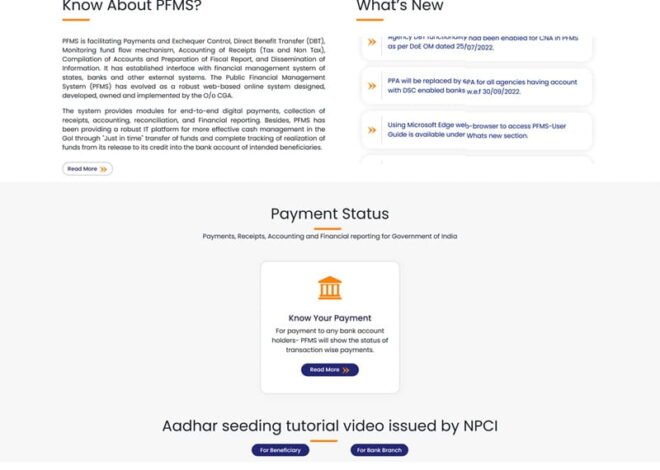
Step 2: Click on “Know Your Payment”
- On the homepage, find the option “Know Your Payment”
- Click on it
This is the main section for checking DBT status.
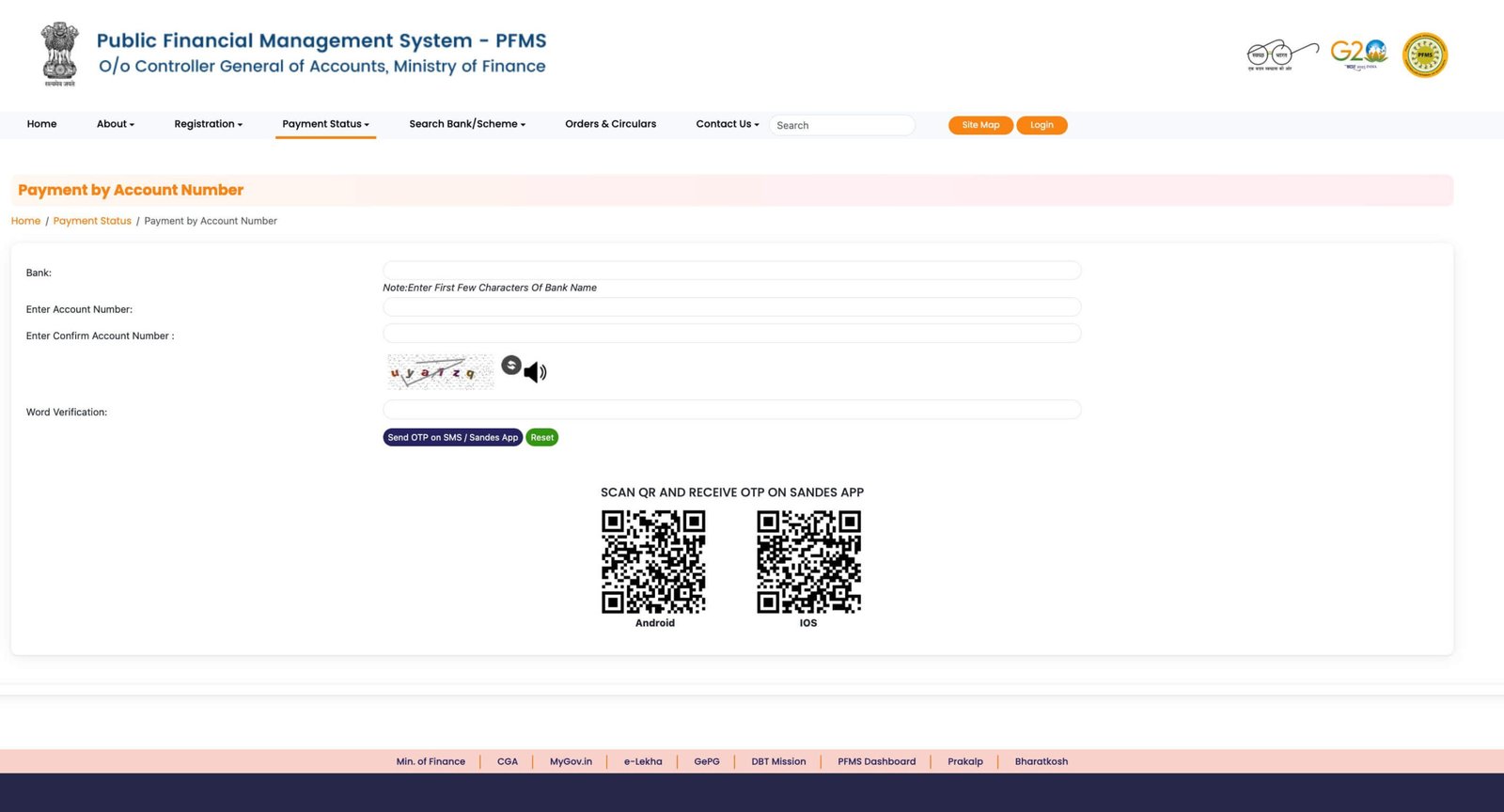
Step 3: Select Your Bank
- Choose your bank from the dropdown list
Make sure you select the same bank used during application.
Step 4: Enter Bank Account Number
- Enter your account number
- Enter it again to confirm
Check carefully before moving ahead.
Step 5: Enter Captcha Code
- Type the captcha exactly as shown
- This is required for verification
Step 6: Click on “Search”
- Click the Search button
- Wait a few seconds
The system will fetch your payment details.
Step 7: View Your DBT Payment Status
You will see details such as:
- Payment status
- Amount
- Date
- Scheme name
This confirms whether your DBT payment has been processed.
Understanding Payment Status
Success
Money has been credited to your bank account.
Pending
Payment is still under process.
Processed
Payment has been sent to the bank but may take time to reflect.
Failed
Payment could not be completed due to some issue.
Sent to Bank
Payment has reached the bank but is not yet credited.
What to Do If Payment Is Not Showing
If no result appears:
- Check your account number again
- Ensure correct bank selection
- Wait if payment has not been processed yet
Sometimes data takes time to update.
What to Do If Payment Is Delayed
If your payment is delayed:
- Wait for 2–3 working days
- Check your bank account
- Visit your bank branch
- Verify account status and KYC
- Confirm Aadhaar linking (if required)
If needed, contact your scheme authority.
Common Mistakes to Avoid
- Entering incorrect account number
- Selecting the wrong bank
- Checking status too early
- Ignoring captcha errors
These small mistakes can prevent results from showing.
Tips for Accurate Tracking
- Use the same bank account provided in your application
- Keep your account active
- Complete KYC formalities
- Link Aadhaar if required
- Check PFMS periodically
These steps help ensure smooth tracking.
Real-Life Example
A beneficiary checks PFMS:
- Status shows “Processed”
- Money not yet received
After one day:
- Amount credited to bank account
This is a normal delay.
FAQs
1. Do I need to log in to check DBT status?
No, you can check it without login.
2. Is checking DBT status free?
Yes, it is completely free.
3. Can I check using mobile?
Yes, PFMS works on mobile browsers.
4. What if status shows success but money is not received?
Check with your bank, as there may be a delay.
5. Can I track multiple DBT payments?
Yes, but one account at a time.
Final Thoughts
Checking DBT payment status on PFMS is simple once you know the correct steps. You don’t need any account or special access—just your bank details are enough.
The system is designed to give you clarity. Instead of guessing, you can see exactly where your payment stands.
With a few clicks, you can confirm whether your money is on the way, delayed, or already credited.