How to Check PFMS Scholarship Status Online
Waiting for a scholarship can feel uncertain. You’ve applied, your documents are verified, but the big question remains—has the money been released?
In 2026, the easiest way to find out is through the Public Financial Management System (PFMS) portal. This platform shows the exact status of your scholarship payment—whether it’s pending, processed, or credited.
The process is simple, but many students either use the wrong method or expect to log in (which is not required). This guide explains the correct way step by step.
What Is PFMS Scholarship Status?
PFMS scholarship status tells you:
- Whether your payment has been sent
- If it is under process
- Whether it has failed or been credited
It does not show application approval.
It only shows payment status after approval.
Before You Start
Keep these details ready:
- Bank account number (used in application)
- Bank name
- Internet connection
No login or registration needed.
Method 1: Check PFMS Scholarship Status by Bank Account Number
This is the most reliable and recommended method.
Step-by-Step Process
Step 1: Visit Official Website
Go to: https://pfms.nic.in
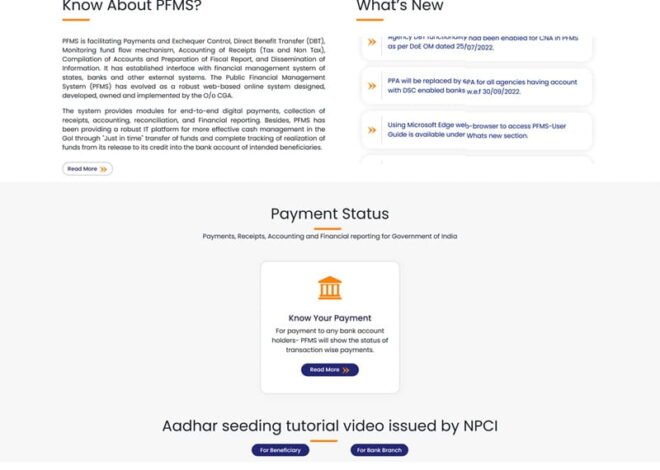
Step 2: Click on “Know Your Payment”
- You will find this option on the homepage
- Click to open tracking page
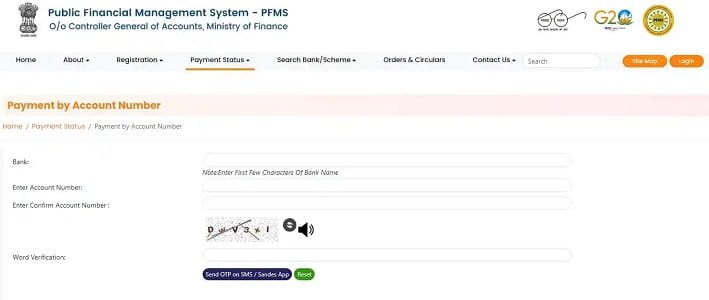
Step 3: Select Your Bank
- Choose your bank from the dropdown list
Step 4: Enter Account Number
- Enter your bank account number
- Re-enter to confirm
Make sure there are no mistakes.
Step 5: Enter Captcha
- Fill the captcha code shown on screen
Step 6: Click “Search”
- Wait a few seconds
Step 7: View Your Scholarship Status
You will see:
- Payment status (Success / Pending / Failed)
- Amount credited
- Date of transaction
- Scheme name
This confirms whether your scholarship has been paid.
Method 2: Check Using Aadhaar (If Linked)
In some cases, you can track using Aadhaar.
Conditions:
- Aadhaar must be linked to bank
- Scheme must support DBT
Steps:
- Enter Aadhaar number
- Submit details
- Check status
If it doesn’t work, use bank method instead.
Understanding PFMS Status
- Success: Money has been credited to your account
- Pending: Payment is under process
- Processed: Sent to bank, may take time
- Failed: Payment did not go through
- Rejected: Bank rejected the transaction
What to Do If Status Is Not Showing
If no result appears:
- Check account number again
- Ensure correct bank is selected
- Wait if payment is not processed yet
Sometimes data takes time to update.
What to Do If Payment Is Delayed
If status shows “Pending” for long:
- Wait 2–3 days
- Check bank account
- Visit bank branch
- Verify Aadhaar linking
- Contact school or scheme authority
Follow this order to avoid confusion.
Common Mistakes to Avoid
- Entering wrong account number
- Using different bank than registered
- Expecting PFMS to show application status
- Trying to log in unnecessarily
PFMS is only for payment tracking.
Important Note About NSP
Many students confuse PFMS with NSP.
NSP (https://scholarships.gov.in)
- Used for application and approval
PFMS
- Used for payment tracking
Both are connected but serve different purposes.
Tips for Accurate Results
- Always use same bank account as application
- Keep account active
- Complete KYC
- Link Aadhaar if required
- Check status regularly
FAQs
1. Do I need login to check PFMS status?
No, it works without login.
2. Can I check status using mobile?
Yes, PFMS works on mobile browser.
3. Why is my status not showing?
Payment may not be processed yet.
4. What if status shows success but no money?
Check with your bank—there may be delay.
5. Is PFMS status accurate?
Yes, it reflects real payment data.
Final Thoughts
Checking your PFMS scholarship status in 2026 is simple once you follow the correct method.
You don’t need to log in, create an account, or depend on anyone. With just your bank details, you can see exactly where your payment stands.
The system is designed to give you clarity.
And once you understand how it works, tracking your scholarship becomes quick, easy, and stress-free.