How to Track NSP Scholarship Payment on PFMS Portal
After applying for a scholarship on NSP, most students keep checking the same portal again and again. But once your application is approved, NSP stops showing meaningful updates about the money.
That’s where the Public Financial Management System (PFMS) portal becomes important. It helps you track the actual payment status—whether your scholarship has been sent, is in process, or already credited.
This guide explains the exact process in a simple and clear way.
First, Understand This Basic Flow
Before tracking, keep this in mind:
- NSP handles application and approval
- PFMS handles payment
So you should move to PFMS only after your NSP status shows:
- Approved
- Sent to PFMS
- Payment Processed
If not, PFMS may not show any result.
What You Need Before Checking
Keep these details ready:
- Bank account number (same as used in NSP)
- Bank name
Using incorrect details will show no result.
Step-by-Step: How to Track NSP Scholarship on PFMS
Step 1: Visit PFMS Website
Go to: https://pfms.nic.in
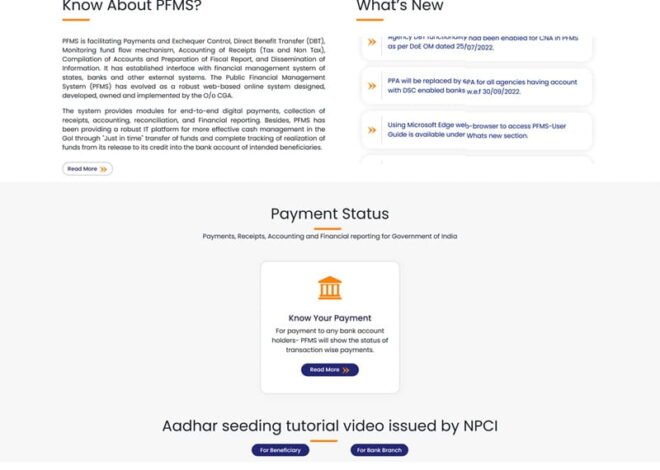
Step 2: Click “Know Your Payment”
- On the homepage, find “Know Your Payment”
- Click on it
This is the main tracking feature.
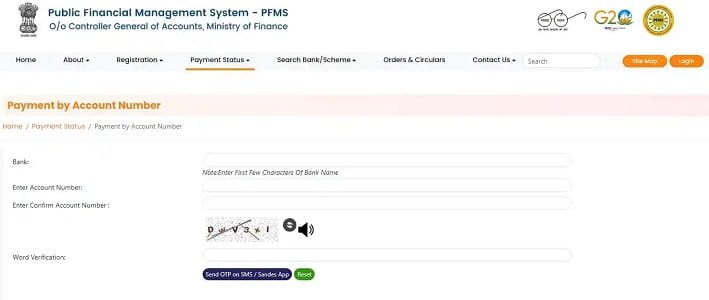
Step 3: Select Your Bank
- Choose your bank from the dropdown list
Make sure it matches your NSP application.
Step 4: Enter Account Number
- Enter your bank account number
- Re-enter it for confirmation
Check carefully before proceeding.
Step 5: Enter Captcha
- Fill the captcha code shown on screen
Step 6: Click Search
- Click the Search button
- Wait a few seconds
Step 7: View Your Payment Status
You will see:
- Payment status
- Amount
- Date
- Scheme name
This confirms whether your scholarship has been processed.
Understanding PFMS Payment Status
Success: Your money has been credited to your bank account.
Pending: Your payment is still under process.
Processed: PFMS has processed the payment; bank will credit it soon.
Sent to Bank: Payment has reached the bank but is not yet credited.
Failed: Payment could not be completed due to an issue.
What If PFMS Shows No Record?
This is common and usually not a problem.
Possible reasons:
- NSP application not yet approved
- Payment not initiated
- Wrong bank details entered
What you should do:
- Check NSP status again
- Wait a few days
- Verify your bank details
What to Do If Payment Is Delayed
If your payment is taking time:
- Wait 2–3 working days
- Check your bank account
- Visit your bank branch
- Confirm account is active and KYC is complete
- Contact your college or scholarship authority
Common Mistakes to Avoid
- Checking PFMS before NSP approval
- Entering wrong account number
- Selecting incorrect bank
- Expecting PFMS to show application details
PFMS only shows payment information.
Tips for Smooth Tracking
- Use the same bank account as NSP
- Keep your account active
- Complete KYC
- Link Aadhaar if required
- Check PFMS after approval
Example
A student checks NSP:
- Status = Sent to PFMS
Then checks PFMS:
- Status = Processed
After 2 days:
- Status = Success
- Money credited
This is the normal flow.
Final Thoughts
Tracking your NSP scholarship through PFMS is simple once you understand the process.
You don’t need any special access or technical knowledge. Just your bank details are enough to see exactly where your payment stands.
Follow the correct order—first check NSP, then check PFMS—and you’ll always have a clear picture of your scholarship payment.
FAQs
Q1. Do I need PFMS login to track payment?
Ans: No, tracking works without login.
2. Can I track using Aadhaar?
Ans: Sometimes, but bank account method is more reliable.
3. Why is PFMS not showing my payment?
Ans: Payment may not have been initiated yet.
4. How long does PFMS take after NSP approval?
Ans: Usually 2–5 working days.
5. What if payment fails?
Ans: Correct bank details and wait for reprocessing.